


自定义单元格合并
简介
单元格自定义合并功能支持用户自定义单元格合并的区域、内容、样式,可用于自定义在表格中添加标注、汇总等信息。
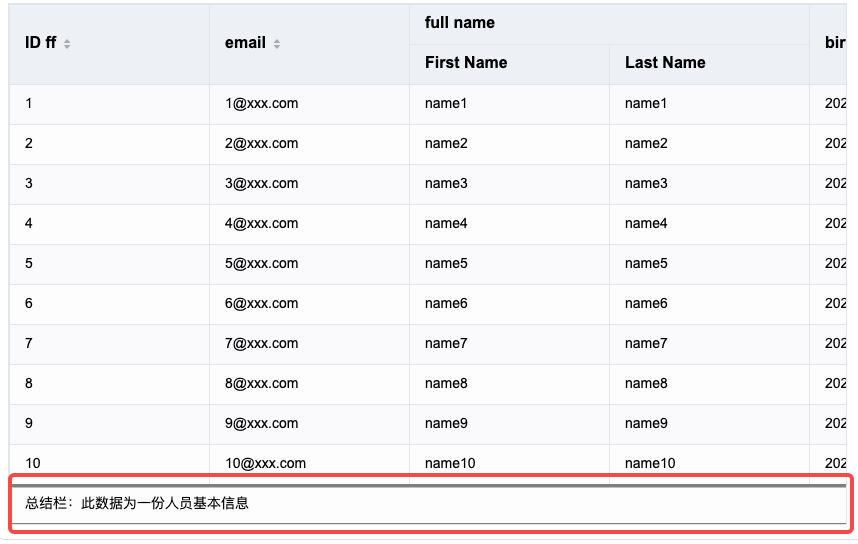
自定义示例代码如下:
const option = {
  records,
  columns,
  widthMode:'standard',
  bottomFrozenRowCount:1,
  customMergeCell: (col, row, table) => {
    if (col >= 0 && col < table.colCount && row === table.rowCount-1) {
      return {
        text: '总结栏:此数据为一份人员基本信息',
        range: {
          start: {
            col: 0,
            row: table.rowCount-1
          },
          end: {
            col: table.colCount-1,
            row: table.rowCount-1
          }
        },
        style:{
          borderLineWidth:[6,1,1,1],
          borderColor:['gray']
        }
      };
    }
  }
};
const tableInstance = new VTable.ListTable(document.getElementById(CONTAINER_ID),option);
使用方法
customMergeCell属性需要传入一个函数,该函数的参数为当前单元格的行列索引,以及当前表格的实例,返回值为一个对象,对象的属性如下:
| 属性名 | 类型 | 描述 |
|---|---|---|
| text | string | 合并单元格的文字内容 |
| range | { start: { col: number, row: number }, end: { col: number, row:number } } | 合并单元格的范围 |
| style | ThemeStyle | 合并单元格的样式,与ThemeStyle属性相同 |
| customRender | ICustomRender | 自定义渲染函数 |
| customLayout | ICustomLayout | 自定义布局函数 |
例如,要合并col从0到3,row从0到1的单元格,需要在customMergeCell函数中加入一个判断col >= 0 && col < 4 && row >= 0 && row < 2,并返回一个合并单元格对象,对象的range属性应该为{ start: { col: 0, row: 0 }, end: { col: 3, row: 1 } },条件判断的范围和range属性中的范围必须要一致。如果有多个合并区域,就需要加入多个判断:
if (col >= 0 && col < 4 && row >= 0 && row < 2) {
  return {
    text: '合并区域1',
    range: {
      start: {
        col: 0,
        row: 0
      },
      end: {
        col: 3,
        row: 1
      }
    }
  };
} else if (col >= 5 && col < 7 && row === 1) {
  return {
    text: '合并区域2',
    range: {
      start: {
        col: 5,
        row: 1
      },
      end: {
        col: 6,
        row: 1
      }
    }
  };
}
style样式如果不配置,会使用单元格原本的样式。
自定义渲染
自定义单元格合并除了可以配置文字内容外,也可以使用自定义布局和自定义渲染功能。在customMergeCell函数返回的对象中配置customRender或customLayout属性,即可在合并区域实现自定义渲染或自定义布局效果。自定义渲染或自定义布局的详细用法可以参考:自定义渲染和自定义布局。