


散点地图标签组件
散点地图标签组件是一种非常规的地图标签布局方式,标签是 MarkPoint 组件 的形式,尽可能围绕在地图周边布局。目前只推荐在中国地图中使用。
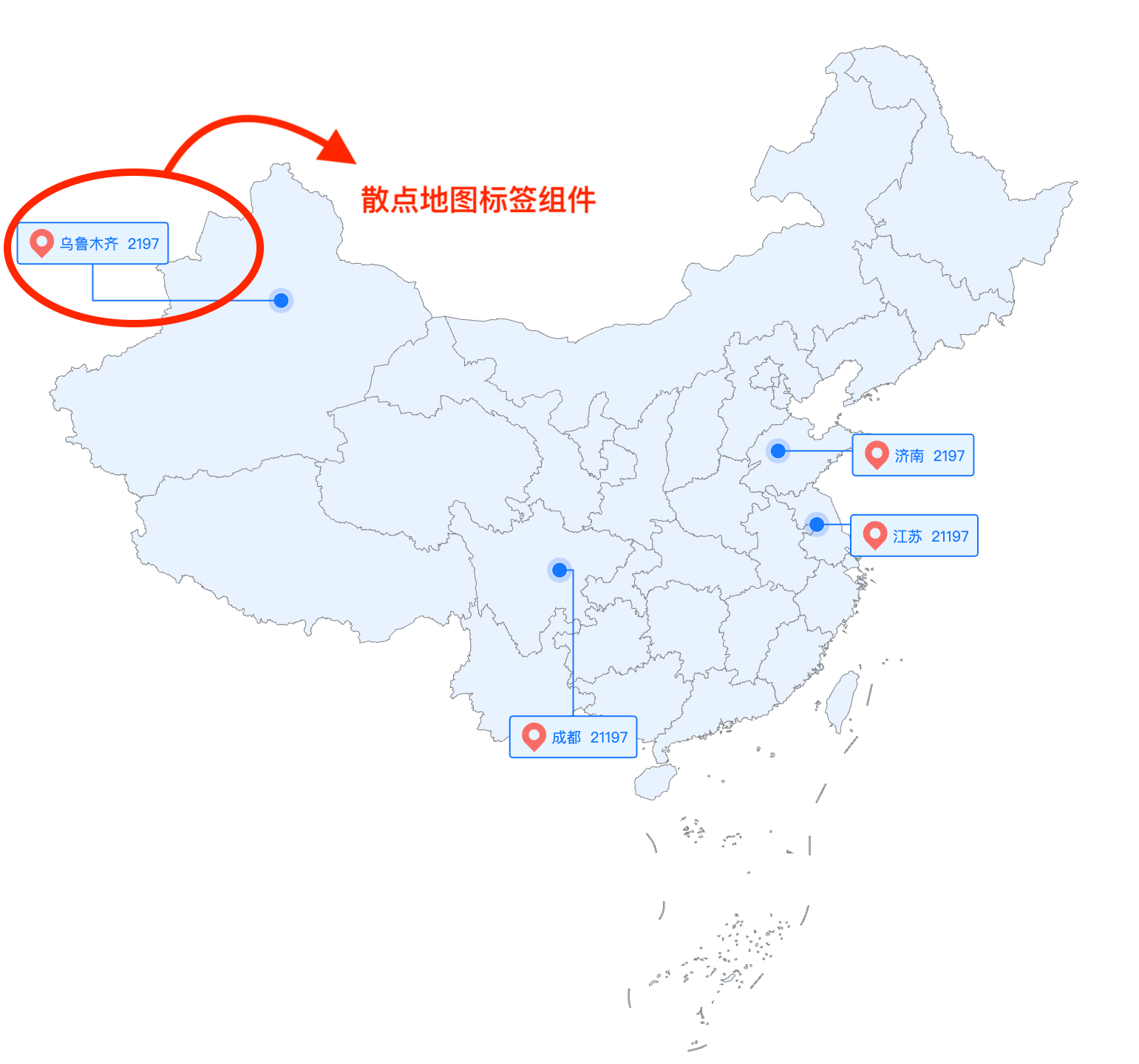
如何使用该组件
散点地图是 VChart 默认支持的,可以通过组合图(Common Chart)实现。
const spec = {
    type: 'common',
    padding: 50,
    region: [
      {
        roam: true,
        coordinate: 'geo',
        longitudeField: 'lon',
        latitudeField: 'lat'
      }
    ],
    series: [
      {
        type: 'map',
        map: 'china',
        nameField: 'name',
        valueField: 'value',
        seriesField: 'name',
      },
      {
        regionIndex: 0,
        id: 'scatter',
        type: 'scatter',
        data: {
          values: [
           ...
          ]
        },
        xField: 'name',
        yField: 'value',
      }
    ]
  };
散点地图标签组件需要在图表上注册,注册和使用方式如下:
import VChart from '@visactor/vchart';
import { registerMapLabel } from '@visactor/vchart-extension';

const spec = {
  //  your spec
  type: 'common',
  ...,
  mapLabel: {
    visible: true,
    position: 'outer',
    seriesId: 'scatter',
    nameField: 'name',
    valueField: 'value',
    space: 6,
    nameLabel: {},
    valueLabel: {},
    leader: {},
    background: {}
  }
};
registerMapLabel();

const vchart = new VChart(spec, { dom: 'chart' });
vchart.renderSync();
如果是通过 cdn 引入的方式,注册方式如下:
<script src="https://cdn.jsdelivr.net/npm/@visactor/vchart/build/index.min.js"></script>
<script src="https://cdn.jsdelivr.net/npm/@visactor/vchart-extension/build/index.min.js"></script>
<script>
  const spec = {
    //  your spec
  };
  VChartExtension.registerMapLabel();

  const vchart = new VChart.defatult(spec, { dom: 'chart' });
  vchart.renderSync();
</script>
相关配置项
export interface IMapLabelSpec extends IMapLabelStyleSpec {
  /** 关联的系列 id */
  seriesId: StringOrNumber;
  /** 名称文本的数据字段 */
  nameField?: string;
  /** 数值文本的数据字段 */
  valueField?: string;
  /**
   * 交互触发类型
   * @default 'none'
   */
  trigger?: 'hover' | 'click' | 'none';
}

export interface IMapLabelStyleSpec {
  /**
   * 是否显示
   * @default false
   */
  visible?: boolean;
  /**
   * 标签非 outer 位置下与标记点的间距
   * @default 12
   */
  offset?: number;
  /**
   * icon 和 label之间的距离
   * @default 10
   */
  space?: number;
  /**
   * 标签位置。支持 'left' | 'top' | 'right' | 'bottom' | 'outer'
   * @default 'top'
   */
  position?: LabelPosition;
  /** 名称文本样式设置 */
  nameLabel?: {
    visible?: boolean;
    style?: ITextMarkSpec;
  };
  /** 数值文本样式设置 */
  valueLabel?: {
    visible?: boolean;
    style?: ITextMarkSpec;
  };
  /** 图标样式设置 */
  icon?: {
    visible?: boolean;
    style?: ISymbolMarkSpec;
  };
  /** 背景样式设置 */
  background?: {
    /** @default true */
    visible?: boolean;
    /** 背景框边距 */
    padding?: IPadding;
    style?: IRectMarkSpec;
  };
  /** 引导线样式设置 */
  leader?: {
    visible?: boolean;
    style?: IPathMarkSpec;
  };
}