1. 整体架构
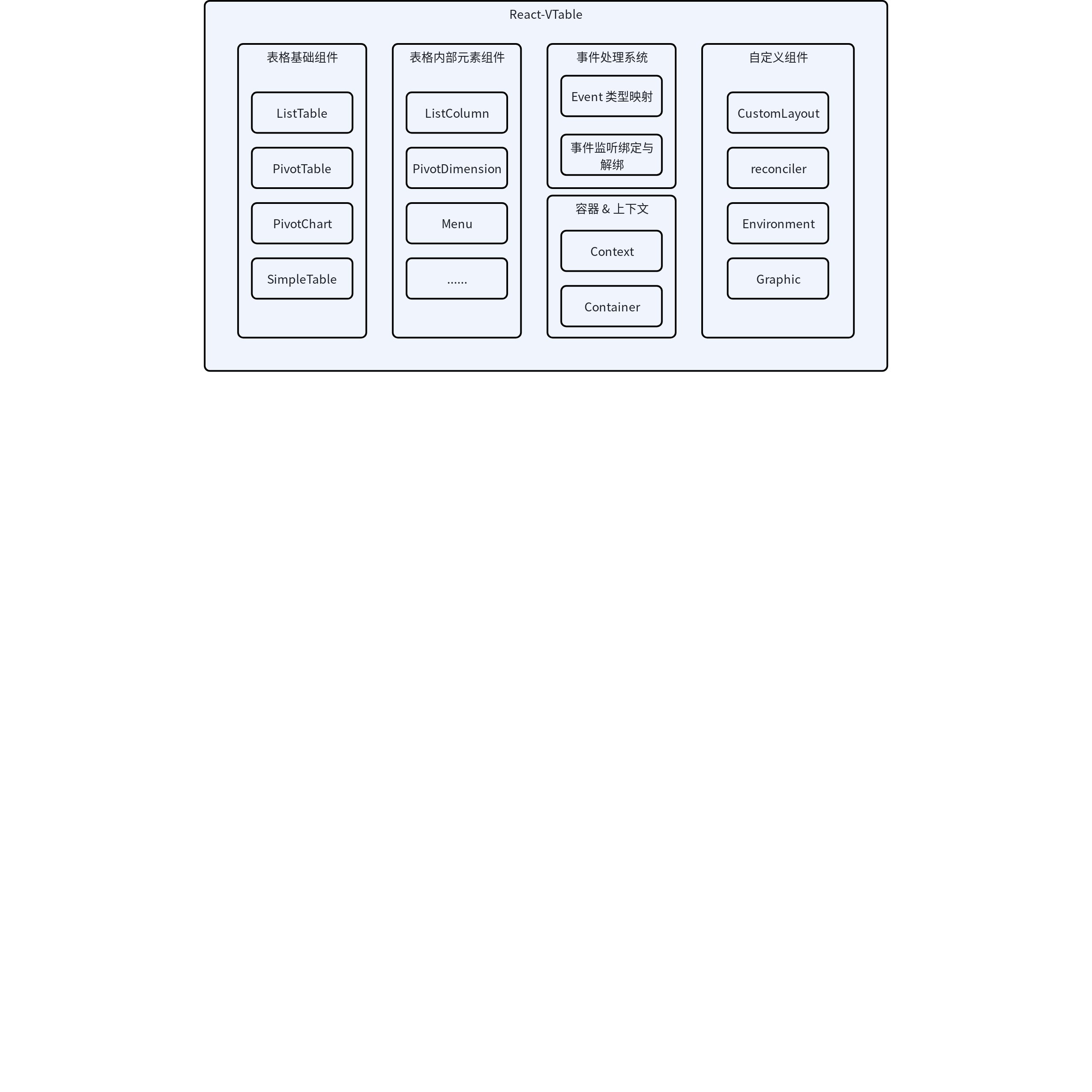
React-VTable 是一个基于 @visactor/vtable 封装的 React 组件库,提供了声明式的表格渲染能力。该库主要由以下几个部分组成:
-
表格组件:包括 ListTable、PivotTable、PivotChart 等主要表格类型
-
表格内部元素组件:如 ListColumn、PivotDimension 等表格内部配置组件
-
事件处理系统:统一管理表格交互事件
-
容器与上下文管理模块:处理表格的渲染容器和生命周期,提供表格状态共享机制
-
自定义组件:使用封装的react组件或使用外部的react组件实现自定义渲染功能
2. 核心组件
2.1 基础表格 (BaseTable)
BaseTable 是所有表格类型的基础组件,定义在 src/tables/base-table.tsx 中。它负责:
-
创建并管理表格实例
-
处理表格option和相关配置
-
管理表格的生命周期
-
绑定事件处理函数
BaseTable 组件使用 React 的 forwardRef 将表格实例暴露给父组件,并通过 React 的 Context API 提供表格上下文。
关键实现:
const BaseTable: React.FC<Props> = React.forwardRef((props, ref) => {
  // 状态管理和引用
  const [updateId, setUpdateId] = useState<number>(0);
  const tableContext = useRef<TableContextType>({});
  useImperativeHandle(ref, () => tableContext.current?.table);

  // 创建表格实例的方法
  const createTable = useCallback(
    (props: Props) => {
      const vtable = new props.vtableConstrouctor(props.container, parseOption(props));
      // ... 设置表格属性
      tableContext.current = { ...tableContext.current, table: vtable };
      // ... 其他初始化逻辑
    },
    [/* 依赖项 */]
  );

  // 更新表格逻辑与生命周期处理
  // ...
});
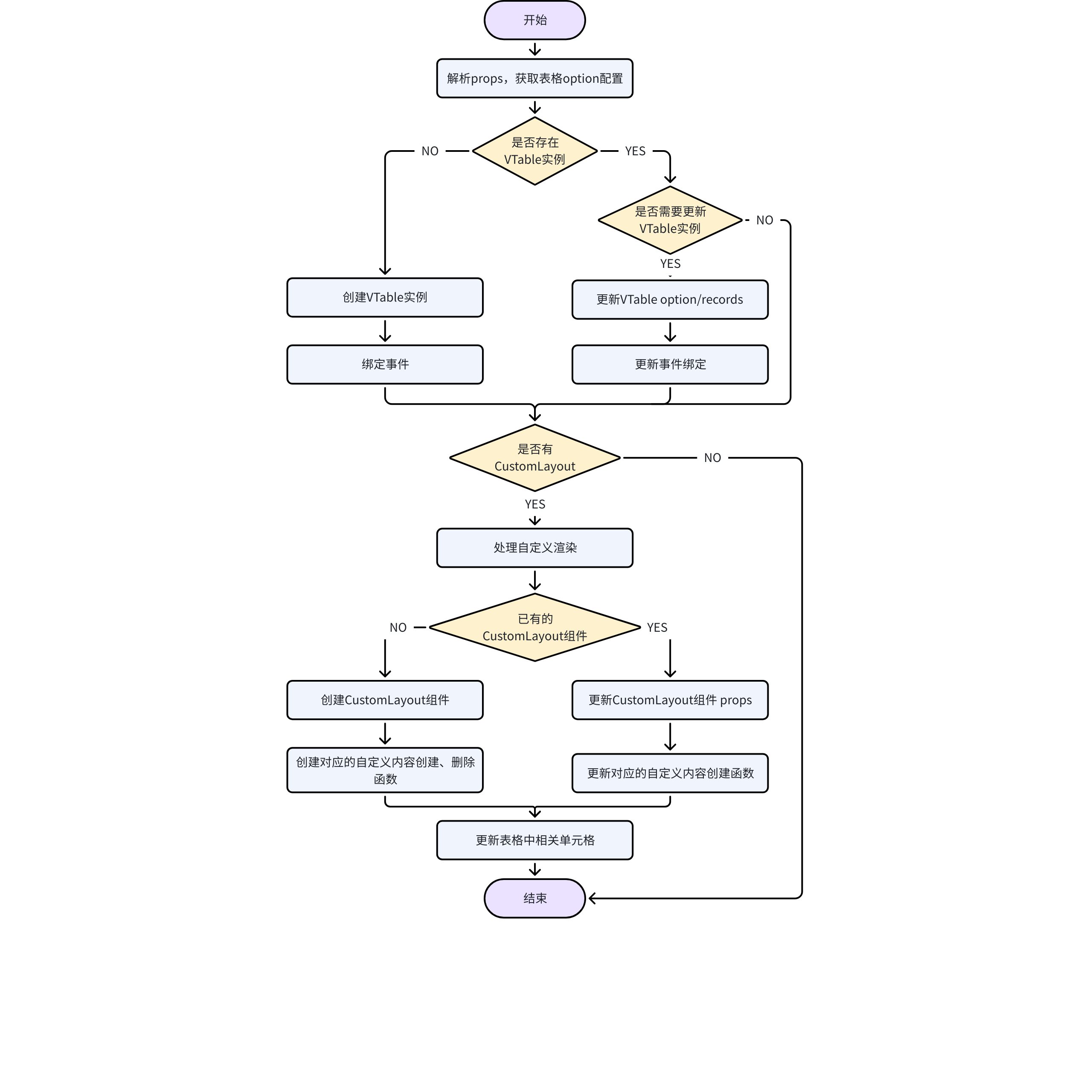
每一次props变化,获取到变化后的table option,对比判断是否需要更新table,如果需要则对table实例进行创建或更新。
关键实现:
const BaseTable: React.FC<Props> = React.forwardRef((props, ref) => {
  // ...
  //
    useEffect(() => {
    const newOptionFromChildren = hasOption ? null : parseOptionFromChildren(props);

    if (!tableContext.current?.table) {
      // ... 创建table实例
      createTable(props);
      // ...
      return;
    }

    if (hasOption) {
      // ... 有option prop时只对比option和record两个props
      if (!isEqual(eventsBinded.current.option, props.option, { skipFunction: skipFunctionDiff })) {
        // ... option发生变化,更新表格实例option
        tableContext.current.table.updateOption(option as any);
      } else if (
        hasRecords &&
        !isEqual(eventsBinded.current.records, props.records, { skipFunction: skipFunctionDiff })
      ) {
        // ... record发生变化,更新表格实例option
        tableContext.current.table.setRecords(props.records as any[]);
      }
      return;
    }

    // ... 从props及children中提取出option
    const newOption = pickWithout(props, notOptionKeys);
    if (
      !isEqual(newOption, prevOption.current, { skipFunction: skipFunctionDiff }) ||
      !isEqual(newOptionFromChildren, optionFromChildren.current, { skipFunction: skipFunctionDiff })
    ) {
      // ... option发生变化,更新表格实例option
      tableContext.current.table.updateOption(option as any);
    } else if (hasRecords && !isEqual(props.records, prevRecords.current, { skipFunction: skipFunctionDiff })) {
      // ... record发生变化,更新表格实例option
      tableContext.current.table.setRecords(props.records);
    }

    // ......
  }, [createTable, hasOption, hasRecords, parseOption, handleTableRender, renderTable, skipFunctionDiff, props]);
});
2.2 具体表格类型
与VTable相同React-VTable提供了几种主要表格类型:
-
ListTable: 列表表格
-
PivotTable: 透视表
-
PivotChart: 透视表
-
简化版表格: ListTableSimple 和 PivotTableSimple,为了包体积优化拆分出的简单版本,只包含基础文字渲染,可以按需注册需要使用的组件
这些组件都是通过 createTable 工厂函数创建的,例如:
export const ListTable = createTable<React.PropsWithChildren<ListTableProps>>('ListTable', {
  type: 'list-table',
  vtableConstrouctor: ListTableConstrouctor as any
});
3. 组件体系
3.1 基础组件创建
React-VTable 使用 createComponent 工厂函数(在 src/table-components/base-component.tsx 中定义)来创建各种表格内部元素组件:
export const createComponent = <T extends ComponentProps>(
  componentName: string,
  optionName: string,
  supportedEvents?: Record<string, string> | null,
  isSingle?: boolean
) => {
  // ...组件实现
};
这个模式使得组件可以:
-
统一处理事件绑定
-
处理组件更新和卸载
-
解析子组件结构
-
管理组件在表格上下文中的状态
3.2 组件类型
主要组件类型包括:
-
列表组件: 如
ListColumn -
透视表组件: 如
PivotColumnDimension,PivotRowDimension,PivotIndicator,PivotColumnHeaderTitle -
UI组件: 如
Menu,Tooltip,EmptyTip -
自定义组件: 如
CustomComponent
这些组件主要配置表格option中的各个部分,例如列的属性、透视表的维度等;它不负责渲染内容,最终会被转换为表格实例option中的属性值。
4. 事件处理系统
事件处理系统定义在 src/eventsUtils.ts 中,提供了:
-
事件类型定义
-
事件回调函数类型
-
事件绑定和解绑逻辑
事件绑定核心代码:
export const bindEventsToTable = <T extends EventsProps>(
  table: IVTable,
  newProps?: T | null,
  prevProps?: T | null,
  supportedEvents: Record<string, string> = TABLE_EVENTS
) => {
  // ... 事件处理逻辑
  // 获取新旧props中的事件
  const prevEventProps: EventsProps = prevProps ? findEventProps(prevProps, supportedEvents) : null;
  const newEventProps: EventsProps = newProps ? findEventProps(newProps, supportedEvents) : null;

  if (prevEventProps) {
    // ... 解绑旧事件
  }

  if (newEventProps) {
    // ... 绑定新事件
  }
};
事件系统中的表格事件与VTable相同,事件回调的名称安装react组件的规范做了一定修改,对应关系如下:
|
React-VTable 事件回调 |
VTable事件名称 |
|
onClickCell |
click_cell |
|
onSelectedCell |
selected_cell |
|
onMouseMoveCell |
mousemove_cell |
|
onResizeColumn |
resize_column |
|
onSortClick |
sort_click |
|
onScroll |
scroll |
|
... |
... |
5. 上下文与容器
5.1 表格上下文
表格上下文定义在 src/context/table.tsx 中,提供了表格实例和配置的共享机制。
5.2 容器组件
withContainer 是一个高阶组件,定义在 src/containers/withContainer.tsx 中,负责:
-
创建和管理表格的 DOM 容器
-
处理表格尺寸的设置与更新
-
管理容器的生命周期
6. 自定义渲染
6.1 核心文件结构
custom 目录包含以下关键文件:
-
custom-layout.tsx: CustomLayout组件 -
vtable-react-attribute-plugin.ts: VRender 渲染 React 组件插件 -
vtable-browser-env-contribution.ts: VRender 浏览器环境适配插件 -
reconciler.ts: React 渲染协调器 -
graphic.ts:自定义布局 图元组件
6.2 CustomLayout 组件
CustomLayout 组件是对于VTable提供的自定义渲染能力的提升,用户可以使用CustomLayout 组件功能封装自己的React组件,并可以在组件中使用原生的DOM React组件。
CustomLayout组件通常作为列、维度或指标的子组件,一个CustomLayout组件会对应多个单元格,也就是对应多个实际渲染的组件实例,因此在CustomLayout组件内主要处理这样的对应关系。
custom-layout.tsx 实现了CustomLayout核心组件:
export const CustomLayout: React.FC<CustomLayoutProps> = ({ children, componentId }) => {
  // ... 创建Map,存储该CustomLayout对应所有单元格的组件实例
  const container = useRef<Map<string, FiberRoot>>(new Map());

  const createGraphic: ICustomLayoutFuc = useCallback(
    args => {
      // ... 使用reconcilor创建自定义组件
    },
    [children]
  );

  const removeContainer = useCallback((col: number, row: number) => {
     // ... 使用reconcilor删除自定义组件
  }, []);

  useLayoutEffect(() => {
    // ...
    if (table && !table.reactCustomLayout?.hasReactCreateGraphic(componentId, isHeaderCustomLayout)) {
      // ... 如果该组件没有在表格中,记录创建与删除方法,并更新表格
      table.reactCustomLayout?.setReactCreateGraphic(
        componentId,
        createGraphic,
        isHeaderCustomLayout
      );
      table.reactCustomLayout?.setReactRemoveGraphic(componentId, removeContainer, isHeaderCustomLayout);
      table.reactCustomLayout?.updateCustomCell(componentId, isHeaderCustomLayout); // update cell content
    } else if (table) {
      // ... 如果该组件在表格中,更新创建方法,并更新以创建的组件
      table.reactCustomLayout?.setReactCreateGraphic(
        componentId,
        createGraphic,
        isHeaderCustomLayout
      );

      container.current.forEach((value, key) => {
        // 更新所有已创建的组件
      });
    }
  });

  return null;
};
6.3 渲染协调器 Reconciler
reconciler.ts 基于react-reconciler实现了 React 渲染协调器,负责 React 组件与 VTable 渲染系统的协调。使用Reconciler可以将VTable自定义渲染中的图元用React的方式封装为组件,详细的react-reconciler配置可以参考https://github.com/facebook/react/tree/main/packages/react-reconciler
6.4 React 属性处理插件
VRender支持用户在图元的react attribute中配置React DOM组件,VTable的自定义渲染使用了这个功能,使用户在封装的自定义组件中可以使用React DOM组件。
vtable-react-attribute-plugin.ts 实现了 VRender 渲染 React 组件插件,是对VRender提供的ReactAttributePlugin插件的继承,针对表格场景进行了部分定制:
export class VTableReactAttributePlugin extends ReactAttributePlugin {
  // ... 渲染graphic对应的HTMLElement
  renderGraphicHTML(graphic: IGraphic) {
    // ... 获取正确的HTML容器
    if (container) {
      container = checkFrozenContainer(graphic);
    }

    // 如果container变化,移除之前渲染过的组件
    if (this.htmlMap && this.htmlMap[id] && container && container !== this.htmlMap[id].container) {
      this.removeElement(id);
    }

    if (!this.htmlMap || !this.htmlMap[id]) {
      // 创建容器
      const { wrapContainer, nativeContainer } = this.getWrapContainer(stage, container);

      if (wrapContainer) {
        if (!this.htmlMap) {
          this.htmlMap = {};
        }

        // ... 实例化组件并缓存
      }
    } else {
      // ... 更新组件
    }

    // ...
  }

  updateStyleOfWrapContainer(
    graphic: IGraphic,
    stage: IStage,
    wrapContainer: HTMLElement,
    nativeContainer: HTMLElement,
    options: SimpleDomStyleOptions & CommonDomOptions
  ) {
    // ... 更新graphic对应的HTMLElement style
  }
}
6.5 浏览器环境适配 BrowserEnvContribution
vtable-browser-env-contribution.ts 提供了浏览器环境的适配层,同样是对VRender提供的BrowserEnvContribution 插件的继承,针对表格场景进行了部分定制:
class VTableBrowserEnvContribution extends BrowserEnvContribution {
  // 更新HTMLElement
  updateDom(dom: HTMLElement, params: CreateDOMParamsTypeForVTable): boolean {
    const tableDiv = dom.parentElement;
    if (tableDiv && params.graphic) {
      // 获取该HTMLElement在表格中的位置和范围
      const top = parseInt(params.style.top, 10);
      const left = parseInt(params.style.left, 10);

      let domWidth;
      let domHeight;
      if ((dom.style.display = 'none')) {
        const cellGroup = getTargetCell(params.graphic);
        domWidth = cellGroup.attribute.width ?? 1;
        domHeight = cellGroup.attribute.height ?? 1;
      } else {
        domWidth = dom.offsetWidth;
        domHeight = dom.offsetHeight;
      }
      if (top + domHeight < 0 || left + domWidth < 0 || top > tableDiv.offsetHeight || left > tableDiv.offsetWidth) {
        // 如果超过表格显示范围,将style.display置为'none',提升交互性能
        dom.style.display = 'none';
        return false;
      }
    }

    // ... 更新style

    return true;
  }
}
6.6 图元组件
graphic.ts 提供了VTable中的自定义渲染图元的组件化封装,用户可以从@visactor/react-vtable的仓容中直接引用这些图元组件。
7. 工作流程
-
用户创建表格组件并配置属性
-
内部组件(如 ListColumn)通过
parseOption方法解析配置 -
BaseTable 创建 VTable 实例并应用配置
-
事件系统绑定用户提供的事件处理函数
-
处理自定义组件