


一、核心机制
前文提到,openinula-vchart提供两种组件声明方式。
-
**统一入口组件,**如:
<VChart ``/>和<VChartSimple /> -
语义化图表组件,包括:
-
图表,如:
<LineChart ``/``><BarChart ``/``>等 -
系列,如
<Line /><Bar />等 -
控件,如
<legend /><Axes />等
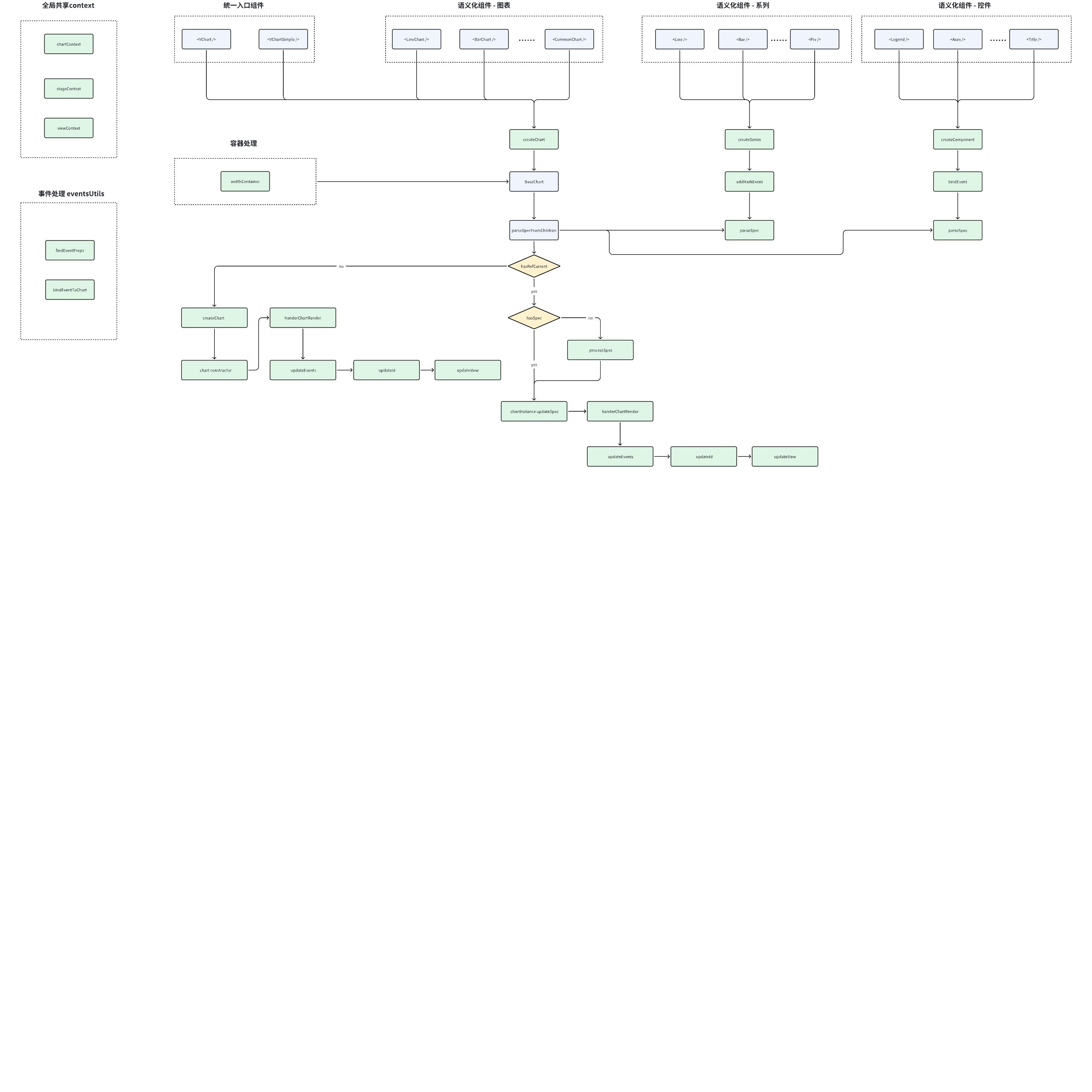
下图展示了openinula-vchart的实现机制:
接下来让我们分别介绍不同模块的具体实现:
二、Chart(图表)
组件入口
packages/openinula-vchart/src/VChart.tsx
packages/openinula-vchart/src/VChartSimple.tsx
packages/openinula-vchart/src/charts
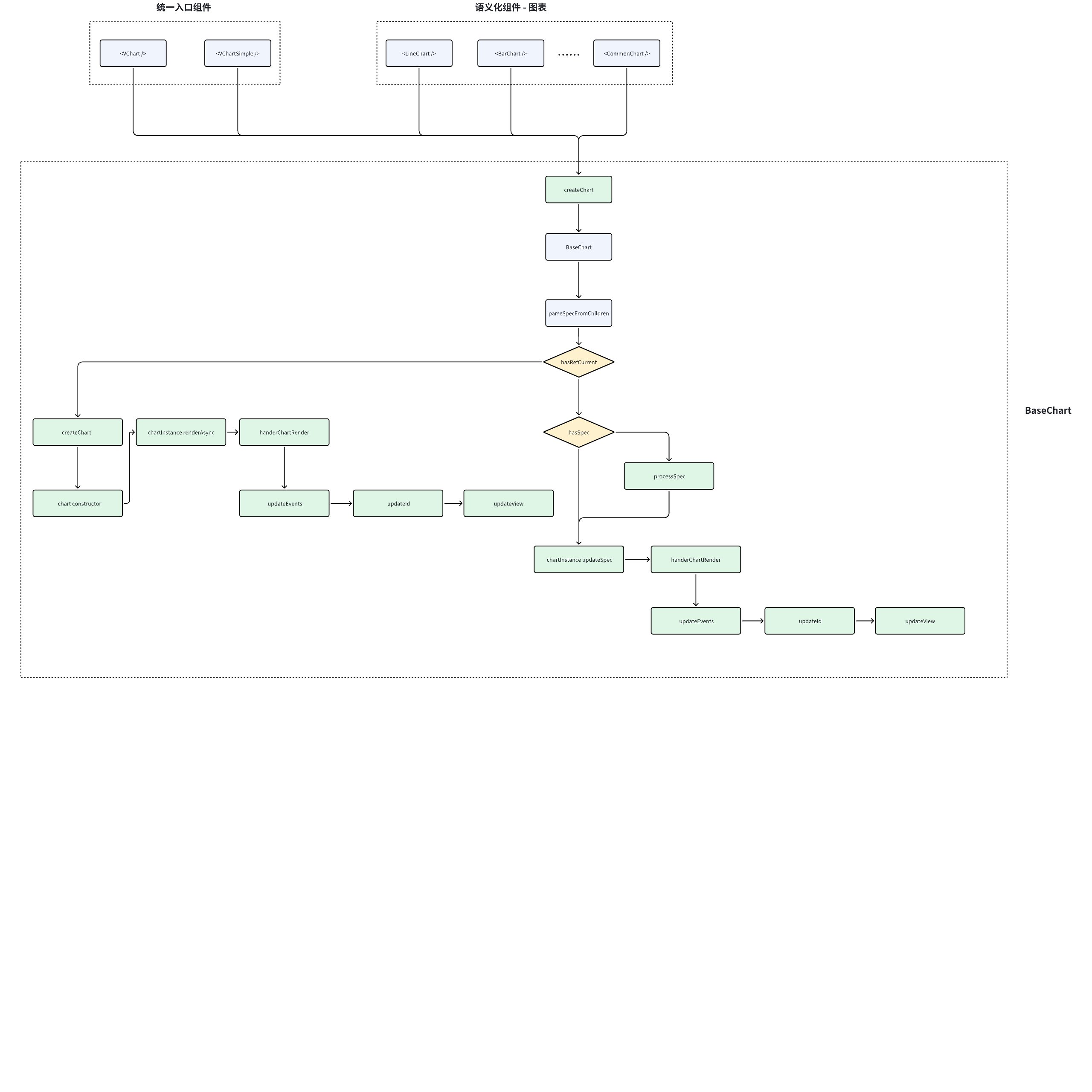
无论是统一入口组件,还是语义化组件,都将走入createChart逻辑,createChart根据不同的参数创建不同的图表。
以<VChart />为例,该组件只做一件事,就是createChart:
import { BaseChartProps, createChart } from './charts/BaseChart';
import VChartCore from '@visactor/vchart';
export { VChartCore };

// 定义 VChart 组件属性,排除基础图表中不需要的 props
export type VChartProps = Omit<BaseChartProps, 'container' | 'data' | 'width' | 'height' | 'type'>;

// 创建 VChart 组件实例
export const VChart = createChart<VChartProps>('VChart', {
  vchartConstrouctor: VChartCore // 构造器: VChart 核心库
});
创建图表容器
packages/openinula-vchart/src/charts/BaseChart.tsx
export const createChart = <T extends Props>(
  componentName: string, // 组件名称, 用于配置class等
  defaultProps?: Partial<T>, // 组件属性,用于创建vchart实例、解析spec、挂载event等
  callback?: (props: T, defaultProps?: Partial<T>) => T // 回调,用于处理props
) => {
  // 基于BaseChart封装容器,并设置css属性、挂在ref等
  const Com = withContainer<ContainerProps, T>(BaseChart as any, componentName, (props: T) => {
    // 自定义属性处理
    if (callback) {
      return callback(props, defaultProps);
    }

    // 如果有默认属性,则将组件属性与默认属性合并
    if (defaultProps) {
      return Object.assign(props, defaultProps);
    }

    // 直接返回属性
    return props;
  });
  // 设置组件识别标志
  Com.displayName = componentName;
  return Com;
};
这一步主要根据传入的组件名称、组件属性和回调,进行:
-
container封装: 基于
**BaseChart**封装,封装时会设置css属性、挂载ref等操作 -
props处理: 如果有自定义属性处理 或 默认属性,进行自定义处理 或 合并默认属性
-
displayName:设置组件识别标志,用于react调试
BaseChart 图表基类
packages/openinula-vchart/src/charts/BaseChart.tsx
状态管理
// 状态管理
const [updateId, setUpdateId] = useState<number>(0); // 图表更新计数器
const chartContext = useRef<ChartContextType>({}); // 图表上下文引用
useImperativeHandle(ref, () => chartContext.current?.chart); // 对外暴露图表实例
const hasSpec = !!props.spec; // 是否存在全量 spec 配置

// 视图与生命周期
const [view, setView] = useState<IView>(null); // 底层 VGrammar 视图实例
const isUnmount = useRef<boolean>(false); // 组件卸载标记

// 配置缓存
const prevSpec = useRef(pickWithout(props, notSpecKeys)); // 过滤非 spec 属性后的配置
const specFromChildren = useRef<Omit<ISpec, 'type' | 'data' | 'width' | 'height'>>(null); // 子组件生成的 spec

// 事件系统
const eventsBinded = React.useRef<BaseChartProps>(null); // 已绑定的事件属性缓存

// 性能优化
const skipFunctionDiff = !!props.skipFunctionDiff; // 是否跳过函数对比

// tooltip节点
const [tooltipNode, setTooltipNode] = useState<ReactNode>(null); // 自定义 tooltip 节点
其中两个核心设计:
-
差异对比优化 :通过 prevSpec 和 pickWithout 实现精准的配置变更检测
-
双更新模式 :根据 hasSpec 变量 辨别全量 spec 更新和声明式组件更新 两种模式
子组件spec解析
const parseSpecFromChildren = (props: Props) => {
  // 初始化空 spec 对象(排除 type/data/width/height 字段)
  const specFromChildren: Omit<ISpec, 'type' | 'data' | 'width' | 'height'> = {};

  // 将子组件转换为数组并遍历
  toArray(props.children).map((child, index) => {
    // 获取子组件的 parseSpec 方法(需组件实现)
    const parseSpec = child && (child as any).type && (child as any).type.parseSpec;

    if (parseSpec && (child as any).props) {
      // 生成子组件 props:自动添加 componentId
      const childProps = isNil((child as any).props.componentId)
        ? {
            ...(child as any).props,
            componentId: getComponentId(child, index) // 生成唯一组件ID
          }
        : (child as any).props;

      // 调用子组件的规范解析方法
      const specResult = parseSpec(childProps);

      // 合并解析结果到总 spec
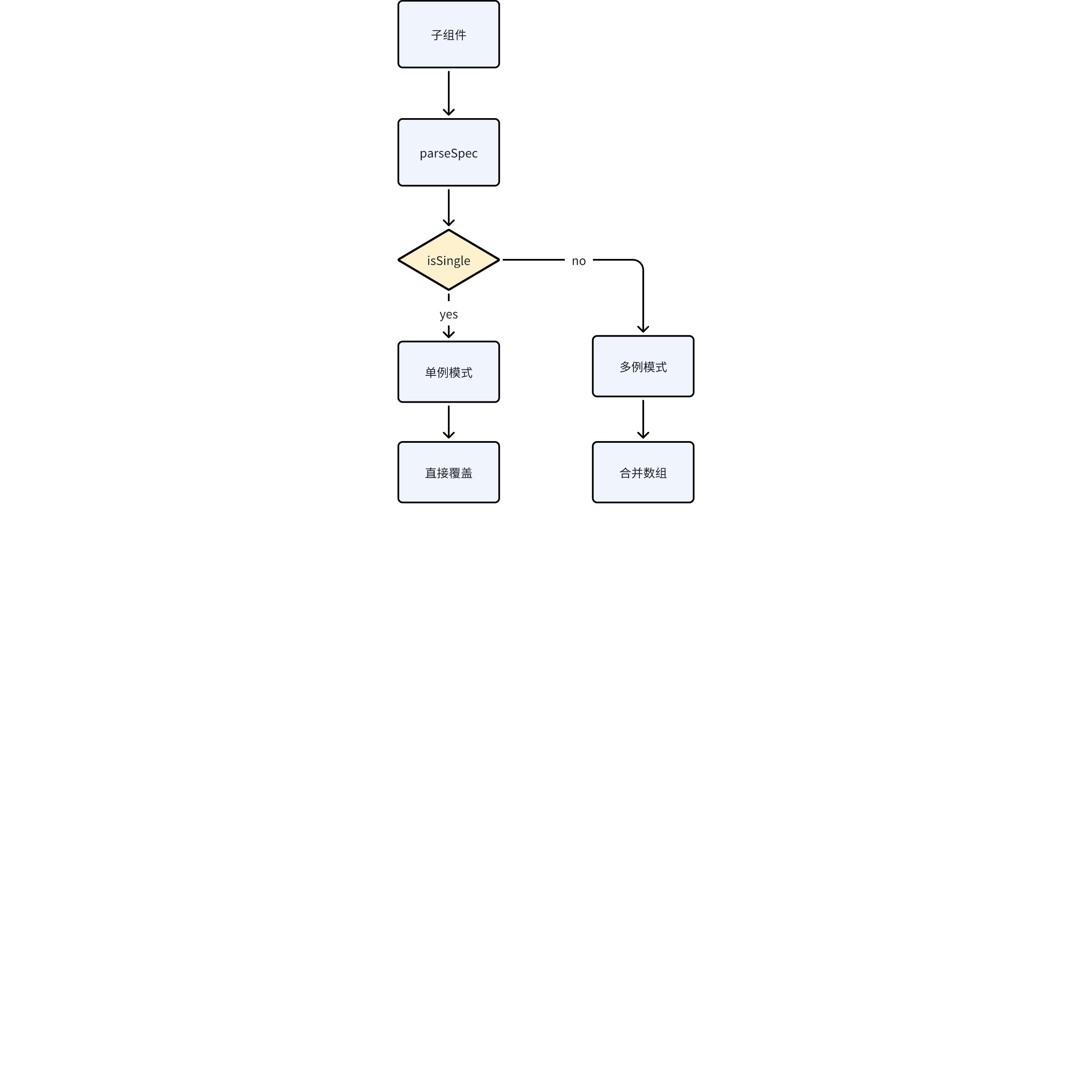
      if (specResult.isSingle) {
        // 单例模式(如标题组件)
        specFromChildren[specResult.specName] = specResult.spec;
      } else {
        // 多例模式(如多个数据标记)
        if (!specFromChildren[specResult.specName]) {
          specFromChildren[specResult.specName] = [];
        }
        specFromChildren[specResult.specName].push(specResult.spec);
      }
    }
  });

  return specFromChildren;
};
本模块主要做的是将子组件中的spec解析出来并挂载到specFromChildren上。由于不同的组件配置模式不同,有的是单例,有的是多例,所以解析的逻辑也略有不同。
本模块的重点内容:
- 声明式组件转换 :
将类似这样的 JSX 声明:
<LineChart>
  <Mark type="point" />
  <Axis orient="bottom" />
</LineChart>
转换为 VChart 标准的 JSON spec:
{
  "mark": [{ "type": "point" }],
  "axes": [{ "orient": "bottom" }]
}
- 组件唯一标识 :
通过 getComponentId 生成的 ID 结构为 组件类型-索引 (如 'Mark-0'),用于:
-
精准的组件更新跟踪
-
避免重复组件冲突
-
调试时组件识别
- 双模式spec合并策略 :
典型子组件实现
以 Marker 组件为例:
// 实现 parseSpec 方法
class MarkPoint extends BaseComponent {
  static parseSpec(props: MarkProps) {
    return {
      specName: 'markPoint',  // 对应 spec 中的字段名
      isSingle: false,   // 允许多个 MarkPoint 组件
      spec: {
        type: props.type,
        style: props.style
      }
    };
  }
}
创建图表
const createChart = (props: Props) => {
  // 1. 实例化图表(利用传入的图表构造器)
  const cs = new props.vchartConstrouctor(
    parseSpec(props), // 合并后的图表spec
    {
      ...props.options, // 透传图表配置
      onError: props.onError, // 异常处理回调
      autoFit: true,    // 开启自动尺寸适配
      dom: props.container // 绑定 DOM 容器
    }
  );

  // 2. 更新上下文引用
  chartContext.current = { ...chartContext.current, chart: cs };

  // 3. 重置卸载标记
  isUnmount.current = false;
};
spec解析
const parseSpec = (props: Props) => {
  // 决策逻辑:优先使用全量 spec 配置
  let spec: ISpec = undefined;

  // 全量 spec 模式(直接使用传入的 spec)
  if (hasSpec && props.spec) {
    spec = props.spec;
  }
  // 声明式组件模式(合并 props 和子组件生成的 spec)
  else {
    spec = {
      ...prevSpec.current,         // 来自组件 props 的配置
      ...specFromChildren.current  // 来自子组件解析的配置
    } as ISpec;
  }

  // 自定义 tooltip 处理(React 组件与 VChart 的桥接)
  const tooltipSpec = initCustomTooltip(setTooltipNode, props, spec.tooltip);
  if (tooltipSpec) {
    spec.tooltip = tooltipSpec; // 覆盖默认 tooltip 配置
  }

  return spec;
};
渲染图表
  const renderChart = () => {
    if (chartContext.current.chart) {
      chartContext.current.chart.renderSync({
        reuse: false
      });
      handleChartRender();
    }
  };
通过chartContext图表上下文拿到刚才挂载好的实例,并调用实例的renderSync方法渲染图表。
事件绑定 & 上下文更新
const handleChartRender = () => {
  // 1. 安全检查:确保组件未卸载且图表实例存在
  if (!isUnmount.current) {
    if (!chartContext.current || !chartContext.current.chart) {
      return;
    }

    // 2. 事件系统:重新绑定所有图表事件
    bindEventsToChart(chartContext.current.chart, props, eventsBinded.current, CHART_EVENTS);

    // 3. 获取底层视图实例
    const newView = chartContext.current.chart.getCompiler().getVGrammarView();

    // 4. 状态更新:触发子组件重渲染
    setUpdateId(updateId + 1);

    // 5. 生命周期回调:通知父组件渲染完成
    if (props.onReady) {
      props.onReady(chartContext.current.chart, updateId === 0); // 区分首次渲染
    }

    // 6. 更新视图上下文
    setView(newView);
  }
};
这段主要执行图表渲染完成后的处理逻辑,主要实现:
- 事件更新:
通过 bindEventsToChart 实现事件监听器的动态更新,采用差异比对策略避免重复绑定。
这里特别注意在图表重渲染(如数据更新)后,需要重新挂载事件以保证交互响应正确性。
- 双端状态同步
通过 setUpdateId 触发子组件更新(利用key值变化机制),同时将VGrammar视图实例存入React上下文,实现Canvas层与React组件层的状态同步。其中 updateId === 0 的判断区分首次渲染。
- 生命周期通知
通过 onReady 回调实现分层架构中的父子通信,当底层图表完成渲染流水线(布局、绘制、动画)后,通知业务层可进行后续操作(如数据抓取、关联交互等)。
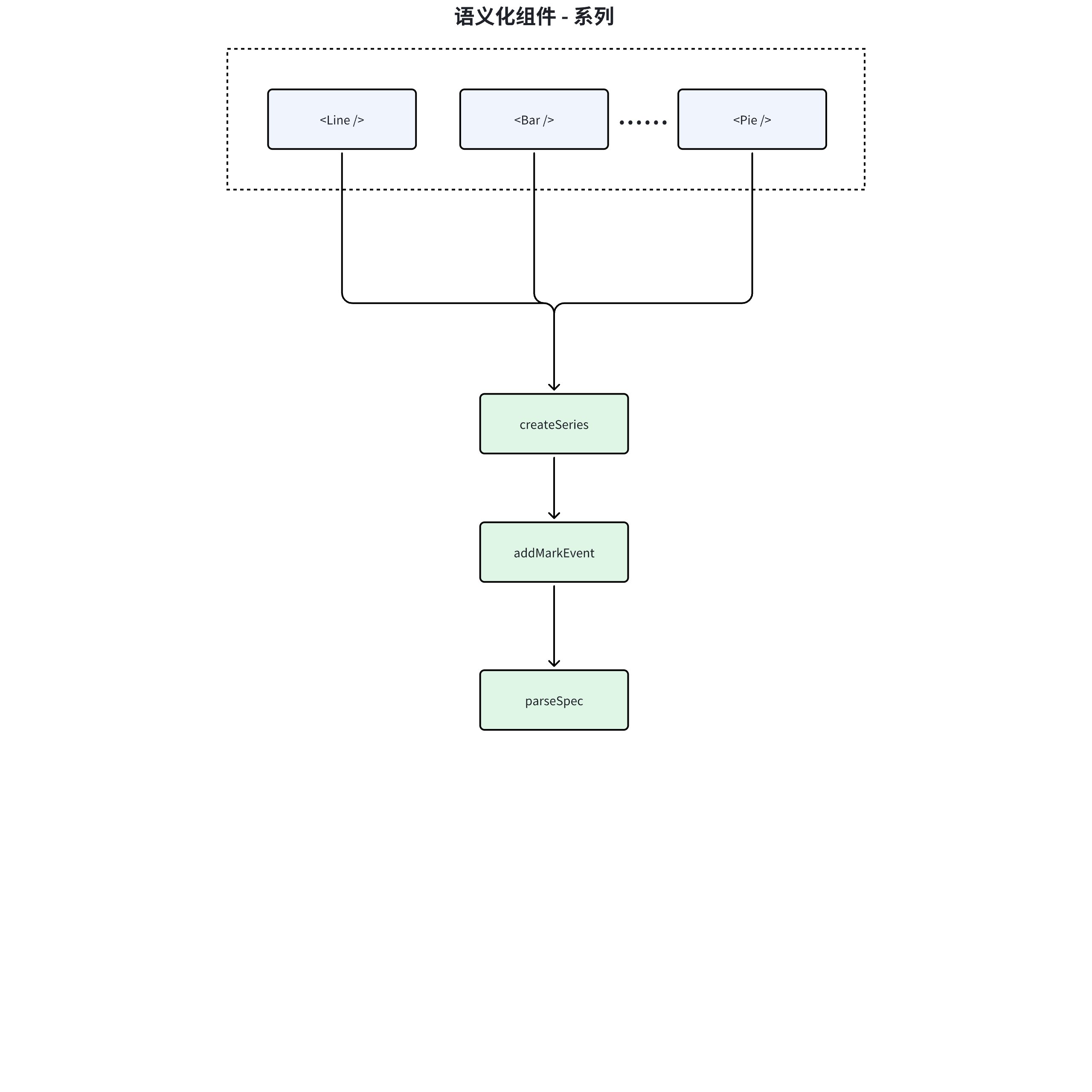
三、Series(系列)
事件绑定
const addMarkEvent = (events: EventsProps) => {
  // 1. 安全校验:确保事件对象和图表实例存在
  if (!events || !context.chart) {
    return;
  }

  // 2. 清理旧事件:遍历解除所有已绑定的事件监听
  if (bindedEvents.current) {
    Object.keys(bindedEvents.current).forEach(eventKey => {
      context.chart.off(REACT_TO_VCHART_EVENTS[eventKey], bindedEvents.current[eventKey]);
      bindedEvents.current[eventKey] = null; // 清除引用
    });
  }

  // 3. 绑定新事件:动态建立 React 事件到 VChart 的映射关系
  events &&
    Object.keys(events).forEach(eventKey => {
      if (!bindedEvents.current?.[eventKey]) {
        // 通过事件类型映射表转换事件名
        context.chart.on(REACT_TO_VCHART_EVENTS[eventKey], handleEvent);

        // 更新绑定记录
        if (!bindedEvents.current) {
          bindedEvents.current = {};
        }
        bindedEvents.current[eventKey] = handleEvent;
      }
    });
};
-
输入检查 :函数接收 events 作为参数,若 events 为空或者 context.chart 不存在,函数会直接返回,不进行后续操作。
-
解除旧事件绑定 :
若 bindedEvents.current 存在,意味着之前已经绑定过事件,此时会遍历 bindedEvents.current 中的每个事件,通过 context.chart.off 方法解除这些事件的绑定,并将 bindedEvents.current 中对应事件键的值置为 null 。
- 绑定新事件 :
若events存在,会遍历 events 中的每个事件。
对于 bindedEvents.current,即事件上下文中不存在的事件,使用 context.chart.on 方法将 handleEvent 绑定到对应的事件上,并且更新上下文。
事件清空
const removeMarkEvent = () => {
  addMarkEvent({});
};
组件卸载时,会将事件清空
spec解析
  (Comp as any).parseSpec = (compProps: T & { updateId?: number; componentId?: string }) => {
    // 从组件属性中移除不需要的键,生成新的系列规范
    const newSeriesSpec = pickWithout<T>(compProps, notSpecKeys);

    // 为每个标记添加默认的 ID
    addMarkId(newSeriesSpec, compProps.id ?? compProps.componentId);

    // 如果提供了 type 参数,则将其添加到spec中
    if (!isNil(type)) {
      (newSeriesSpec as any).type = type;
    }

    // 返回包含系列规范和规范名称的对象
    return {
      spec: newSeriesSpec,
      specName: 'series'
    };
  };
series属于声明式组件,parseSpec会由父组件调用解析并加入到总spec中。
在series中,parseSpec的作用主要是:
-
过滤掉不需要的属性,生成新的系列规范。
-
为每个标记(mark)添加默认的 ID。
-
如果提供了 type 参数,则将其添加到系列规范中。
-
返回包含系列规范和规范名称的对象。
四、Component(控件)
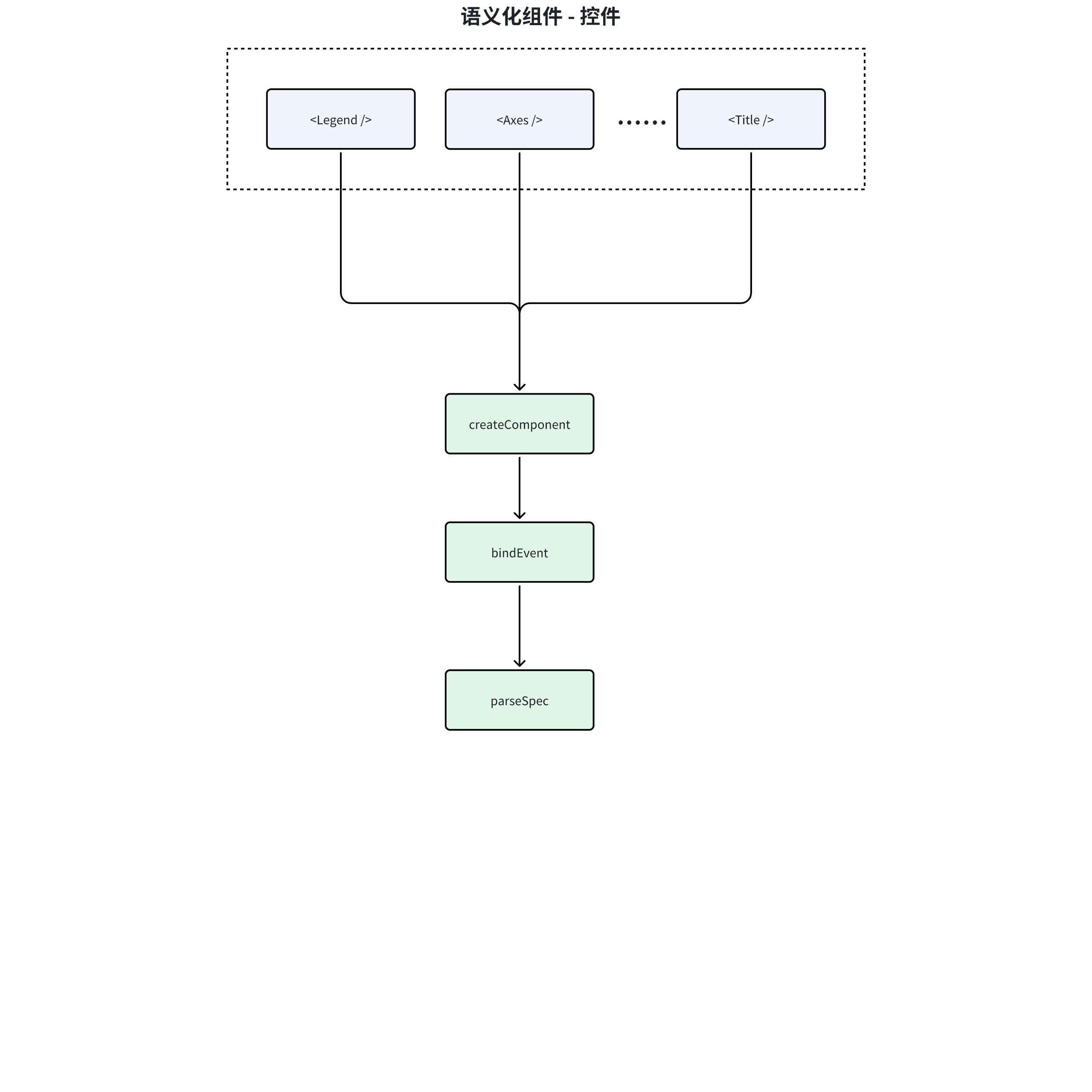
事件绑定
// 检查是否需要更新(通过 updateId 变化检测)
if (props.updateId !== updateId.current) {
  // 更新当前记录的版本号,保持与父组件同步
  updateId.current = props.updateId;

  // 重新绑定图表事件(仅当组件支持事件时执行)
  const hasPrevEventsBinded = supportedEvents
    ? bindEventsToChart( // 调用事件绑定工具方法
        context.chart,        // 从上下文获取图表实例
        props,                // 当前组件属性(含新事件处理器)
        eventsBinded.current, // 之前绑定的事件缓存
        supportedEvents      // 该组件支持的事件类型映射
      )
    : false;

  // 如果事件绑定成功,更新事件缓存引用
  if (hasPrevEventsBinded) {
    eventsBinded.current = props; // 保存当前事件配置用于下次差异比较
  }
}
- 更新检测:
通过 props.updateId !== updateId.current 判断组件是否需要更新, updateId 是来自父组件(通常是图表)的更新标识符,用于触发子组件的更新流程。
- 事件重绑定
当检测到更新时,调用 bindEventsToChart 方法重新绑定事件。这里采用条件判断:
-
如果组件支持事件( supportedEvents 存在),则执行事件绑定
-
绑定成功后更新 eventsBinded 缓存,记录当前绑定的事件属性
-
状态同步 - 更新 updateId.current 为最新值,确保后续更新检测的准确性。
spec解析
  (Comp as any).parseSpec = (props: T & { updateId?: number; componentId?: string }) => {
    // 使用 pickWithout 函数从 props 中移除 notSpecKeys 中指定的键,得到新的组件配置
    const newComponentSpec: Partial<T> = pickWithout<T>(props, notSpecKeys);

    // 返回一个包含新组件配置、specName 和 isSingle 的对象
    return {
      spec: newComponentSpec,
      specName,
      isSingle
    };
  };
-
specName用于判断挂载的specKey
-
isSingle标识用于父组件解析spec时,判断是否单例
五、事件处理
packages/openinula-vchart/src/eventsUtils.ts
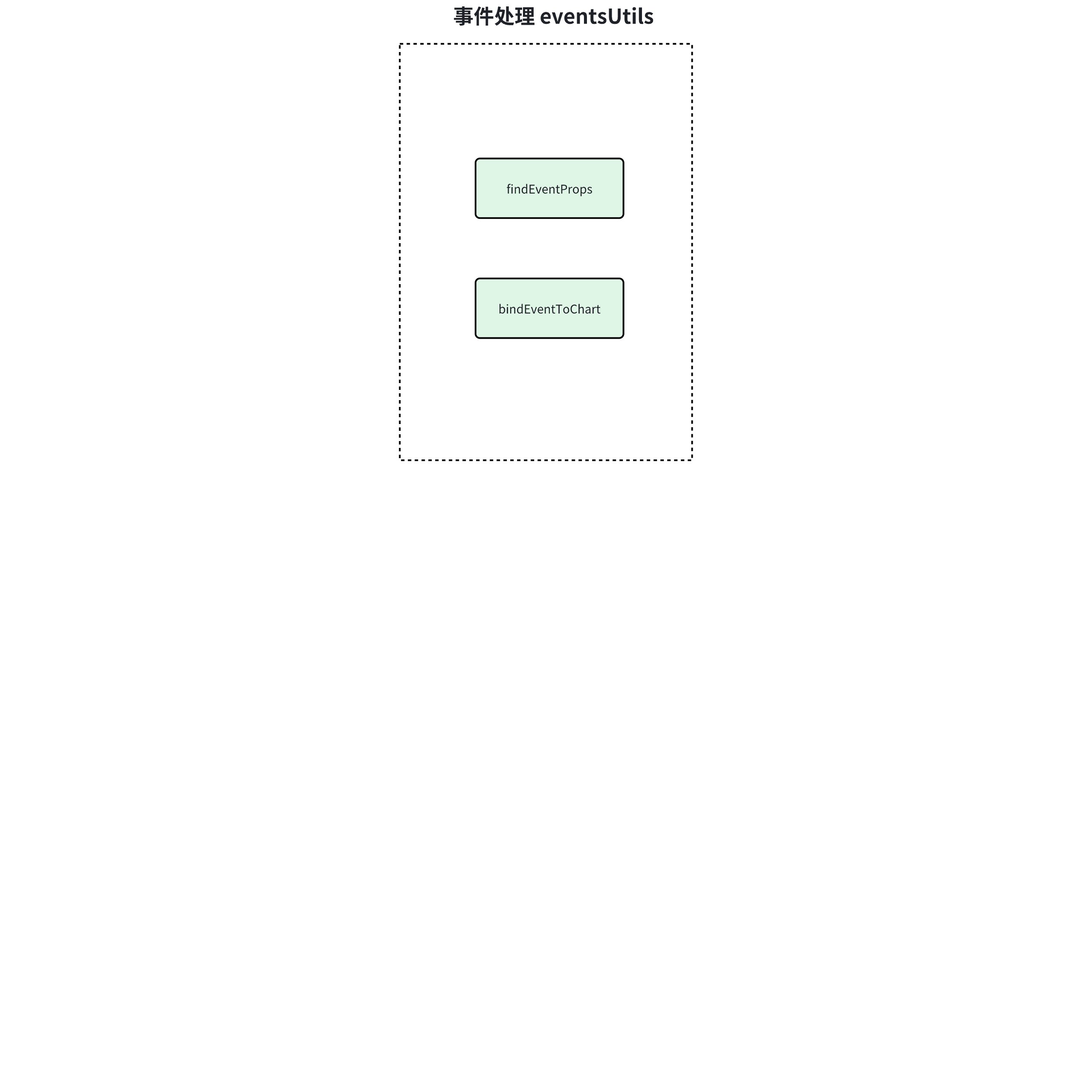
事件提取
// 泛型方法:从组件属性中提取有效事件配置
export const findEventProps = <T extends EventsProps>(
  props: T, // 组件属性集合
  supportedEvents: Record<string, string> = REACT_TO_VCHART_EVENTS // 允许的事件映射表
): EventsProps => {
  const result: EventsProps = {}; // 存储过滤后的事件配置

  // 遍历所有属性键
  Object.keys(props).forEach(key => {
    // 双重校验:1. 是否为支持的事件类型 2. 是否存在有效回调函数
    if (supportedEvents[key] && props[key]) {
      result[key] = props[key]; // 收集符合条件的事件处理器
    }
  });

  return result; // 返回纯净的事件配置对象
};
绑定事件
export const bindEventsToChart = <T>(
  chart: IVChart,  // 图表实例
  newProps?: T | null,  // 新事件属性
  prevProps?: T | null,  // 旧事件属性
  supportedEvents: Record<string, string> = REACT_TO_VCHART_EVENTS // 事件映射表
) => {
  // 安全检查:排除无效调用
  if ((!newProps && !prevProps) || !chart) {
    return false;
  }

  // 新旧事件属性过滤(通过之前分析的 findEventProps 方法)
  const prevEventProps = prevProps ? findEventProps(prevProps, supportedEvents) : null;
  const newEventProps = newProps ? findEventProps(newProps, supportedEvents) : null;

  // 解绑阶段:清理过期事件监听
  if (prevEventProps) {
    Object.keys(prevEventProps).forEach(eventKey => {
      // 差异判断:新属性不存在该事件 或 事件处理器发生变化
      if (!newEventProps || !newEventProps[eventKey] || newEventProps[eventKey] !== prevEventProps[eventKey]) {
        chart.off(supportedEvents[eventKey], prevProps[eventKey]); // 解除旧监听
      }
    });
  }

  // 绑定阶段:注册新事件监听
  if (newEventProps) {
    Object.keys(newEventProps).forEach(eventKey => {
      // 差异判断:旧属性不存在该事件 或 事件处理器发生变化
      if (!prevEventProps || !prevEventProps[eventKey] || prevEventProps[eventKey] !== newEventProps[eventKey]) {
        chart.on(supportedEvents[eventKey], newEventProps[eventKey]); // 注册新监听
      }
    });
  }

  return true; // 标识操作完成
};
六、全局通信
packages/openinula-vchart/src/context
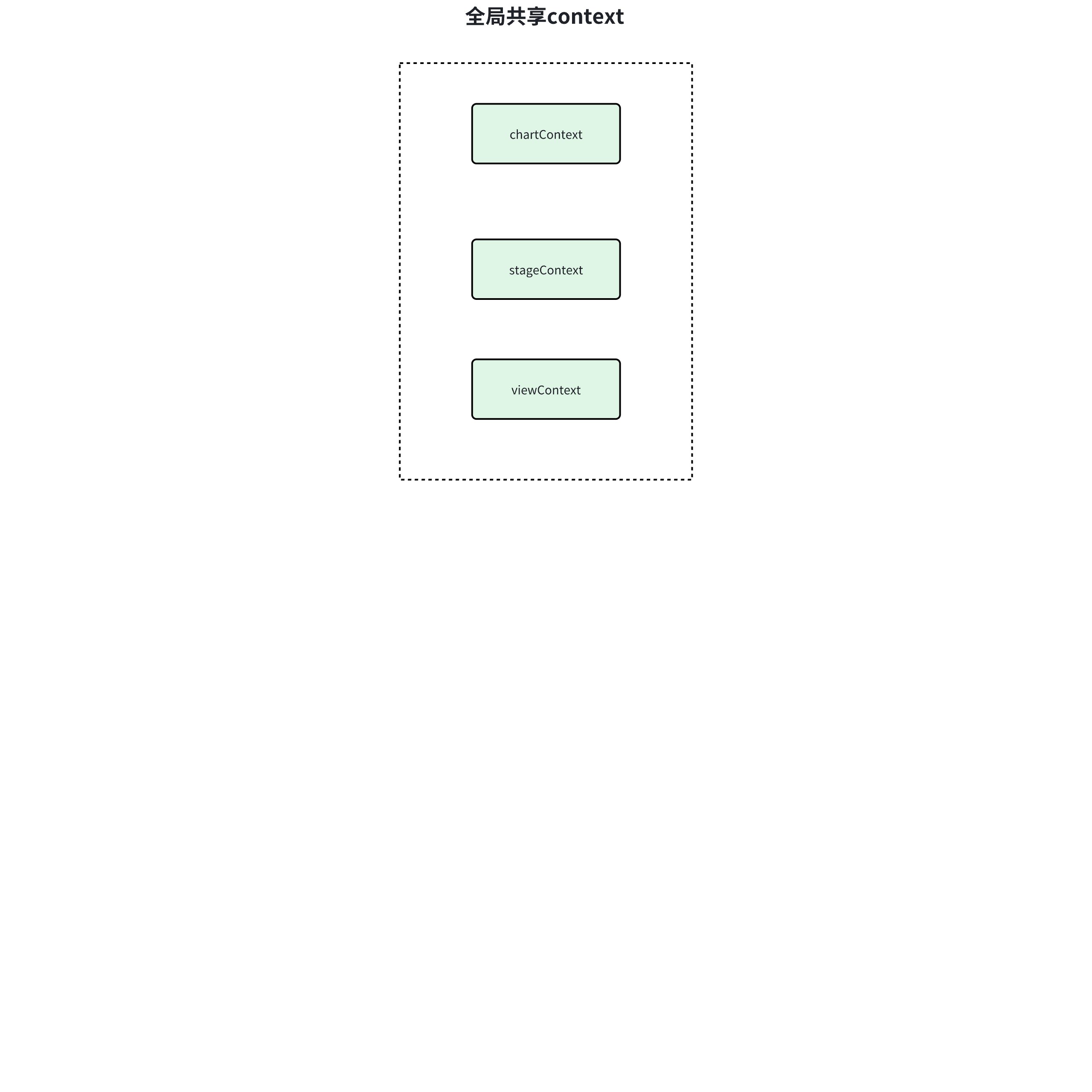
chartContext
export function withChartInstance<T>(Component: typeof React.Component) {
  // 1. 创建转发引用组件
  const Com = React.forwardRef<any, T>((props: T, ref) => {
    // 2. 消费图表上下文
    return (
      <ChartContext.Consumer>
        {(ctx: ChartContextType) =>
          // 3. 注入图表实例到被包裹组件
          <Component
            ref={ref}          // 透传ref
            chart={ctx.chart}  // 注入图表实例
            {...props}         // 透传所有props
          />
        }
      </ChartContext.Consumer>
    );
  });

  // 增强调试信息
  Com.displayName = Component.name;
  return Com;
}
本context主要用于共享VChart实例:
通过 ChartContext.Consumer 获取上下文中的图表实例,以prop形式注入目标组件,使被包裹组件可直接访问 this.props.chart,从而获得图表实例。
viewContext
export function withView<T>(Component: typeof React.Component) {
  // 1. 创建带ref转发的组件
  const Com = React.forwardRef<any, T>((props: T, ref) => {
    // 2. 消费视图上下文
    return (
      <ViewContext.Consumer>
        {/* 3. 注入视图实例到被包裹组件 */}
        {ctx =>
          <Component
            ref={ref}    // 透传ref
            view={ctx}   // 注入VGrammar视图实例
            {...props}   // 透传所有props
          />
        }
      </ViewContext.Consumer>
    );
  });

  // 增强调试信息
  Com.displayName = Component.name;
  return Com;
}
本context主要用于共享VGrammar实例:
通过 ViewContext.Consumer 获取从 <ViewContext.Provider> 传递的VGrammar视图实例。
stageContext
export function withStage<T>(Component: typeof React.Component) {
  // 1. 创建支持ref转发的组件包装器
  const Com = React.forwardRef<any, T>((props: T, ref) => {
    // 2. 消费stage上下文
    return (
      <StageContext.Consumer>
        {/* 3. 将stage实例注入被包装组件 */}
        {ctx =>
          <Component
            ref={ref}      // 透传ref引用
            stage={ctx}    // 注入VRender舞台实例
            {...props}     // 透传所有原始props
          />
        }
      </StageContext.Consumer>
    );
  });

  // 4. 保留原始组件名称便于调试
  Com.displayName = Component.name;
  return Com;
}
本context主要用于共享VRender实例:
通过StageContext.Consumer获取从 <StageContext.Provider> 传递的VRender视图实例。